Help with using the portal
|
| fpetel116. 10. 2008 21:13:49 |
I suggest you first resize the image with an image program and put it in JPEG format. Size 800x600 is quite enough. And thanks for all the effort 
|
|
|
|
| fpetel116. 10. 2008 21:14:31 |
You can upload images only to the current conditions topic.
|
|
|
|
| geppo17. 10. 2008 14:49:06 |
Currently there's nothing anywhere (pictures) - does anyone have these problems too?? (before I tear) the box apart and go for a thorough repair!!
Regards, tell me!!
|
|
|
|
| Kriška17. 10. 2008 14:55:52 |
I can see all pictures nicely.
|
|
|
|
| Tadej17. 10. 2008 15:00:10 |
Geppo maybe you have problems with the browser.
|
|
|
|
| geppo17. 10. 2008 15:13:53 |
No, I think there might be some block ( since when I wanted to delete a wrongly uploaded photo and clicked -do not publish pictures ) - then it started appearing!
If I click ( PUBLISH PICTURES ) the selection window is gray / white and for photo description??
Currently I don't see any photo - on PZ all??
Rok, what do you say about this??
Regards
|
|
|
|
| geppo17. 10. 2008 16:12:03 |
Tadej, exactly
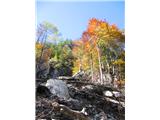
CHROME WORKS!!
Regards
 1 1
| (+1) |  | |
|
|
|
|
| Medvedka17. 10. 2008 17:12:48 |
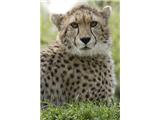
What kind of animal is that? Regards Regards
|
|
|
|
| geppo17. 10. 2008 17:36:37 |
Maybe a lynx?? - photo taken 1985 early summer - no digital cameras back then, so maybe error/mix-up during film development!!
Posing on the grass near the hunting hut in Matkov kot - pity the background isn't visible..
Regards
 1 1
|
|
|
|
| Kriška17. 10. 2008 19:48:23 |
Um geppo, this lynx looks incredibly like a cheetah (and only a little like a lynx) ? ?
| (+1) | | |
|
|
|
|
| Rok17. 10. 2008 20:08:00 |
geppo
You can also try deleting temporary files that the browser stores.
In IE click: tools -> internet options -> delete... -> delete files
In Firefox: tools -> clear private data -> check cache -> clear private data now
|
|
|
|
| geppo20. 10. 2008 06:21:33 |
Did everything ( normally I regularly delete and clean data ) - Firefox ( no photo ), Chrome works normally??
Regards
|
|
|
|
| geppo20. 10. 2008 06:40:59 |
I solved the issue - I tried CONTENT and the option - automatically load images - always allow and it worked! Thanks anyway for the help!!
Regards
|
|
|
|
| Rok20. 10. 2008 07:03:59 |
Probably, you right-clicked on the image and selected "block images".
A solution would also be (Firefox 3): Tools -> Options -> Content -> 2nd exceptions button... -> remove hribi.net from the list.
 1 1
|
|
|
|
| geppo20. 10. 2008 17:51:19 |
Yes, that's exactly what I did (block images), Rok. The confusion is that I use multiple computers and it worked on some, not on others, and I got lost at first!!
Regards
|
|
|
|
| Mrki5. 12. 2012 18:05:04 |
Why is this mess on the portal that was obviously caused by Goodbaby11?!
| (+1) | | |
|
|
|
|
| Laščan5. 12. 2012 19:25:33 |
@Mrki, @Goodbaby11 has been "removed" since yesterday!!
| (+2) | | |
|
|
|
|
| tonisteb19. 08. 2013 10:26:12 |
For some time I've been trying to upload a video, but it keeps giving me an error, I don't know what I'm doing wrong, does anyone else have this problem?
I've already uploaded some video clips, now it doesn't work anymore 
best regards
|
|
|
|
| Rok20. 08. 2013 01:16:28 |
@tonisteb
The video upload error is now fixed.
Regards Rok
Video:
 1 1
|
|
|
|
| Pastirica1. 08. 2024 07:44:15 |
I followed the procedure for publishing GPS track, but only the title got published, under it *Server Error in '/' Application*?
| (+1) | | |
|
|
|
You must log in to post a comment:
If you do not yet have a username, you must first
register.